Tailored for Nigerian users
Find why children miss vaccines, and act where it counts
Mataki helps State and LGA Immunization Officers, and the health workers in their facilities, turn the figures they already collect into clear priorities, likely causes and agreed actions, then follow what happens next.
Tailored for Nigerian users
Mataki is built around Nigeria’s routine immunization programme, from the national schedule down to the ward.
- Your state, LGA and ward, by name
All 36 states and the FCT, all 774 LGAs and 5,872 wards are built in. If your ward is not listed, you can add it when you register.
- The national schedule
Antigens follow Nigeria’s national routine immunization schedule, from BCG, OPV0 and Hep B0 at birth to HPV, with yellow fever, Men A and vitamin A.
- The programme’s levels and actions
Accounts follow the levels officers already work at: facility, ward, LGA and state. An administrator for that place approves each one. Programme standard actions draw on the Reaching Every Ward approach.
- The Nigeria Data Protection Act 2023
The privacy notice and the data processing agreement are written to the Act. You can delete your account, and everything the server holds about you, at any time.
What Mataki does
Five steps, from the first signal to what the team learns. See how each step works.
Sense
Enter the coverage and dropout figures you already report. Mataki checks the data first, then flags the places that need attention.
Understand
Work through the likely root causes with your team, organized by CFIR 2.0, and weigh the other explanations Mataki shows.
Prioritize
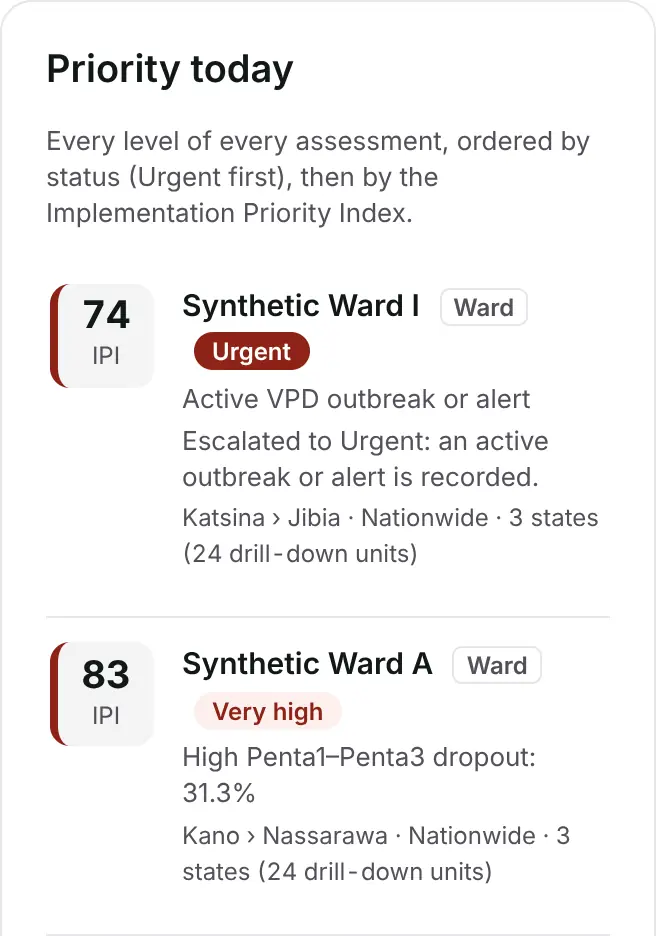
Each place gets a status, from Urgent to Sustain, and an Implementation Priority Index, so the team agrees where to act first.
Recommend
Programme standard actions and CFIR-ERIC strategies are matched to the causes you recorded.
Track and learn
Health workers send short updates from their phones, and Mataki shows which packages of strategies worked, where, and why.
Built for the routine
Mataki is made for the places immunization work happens: review meetings, supervision visits and the field, often on a phone and a weak connection.
Works offline
After you sign in, Mataki keeps working offline for up to 7 days at a time, and can sit on your phone’s home screen like an app.
Readable in daylight
Every line of text meets a 7:1 contrast ratio, and every button is at least 48 pixels tall, for low-cost phones used outdoors.
Your assessments stay with you
Assessments are stored on your device, encrypted with your password, and are not uploaded. Read how Mataki protects data.
Ready for the review meeting
A meeting view and a printable brief put the priorities, causes and actions in front of the whole team.
Who it is for
- State and LGA Immunization Officers, who plan, review and supervise routine immunization.
- Ward and health facility teams, who see what was agreed for their place and report progress.
- National programme and partner staff, who support states and LGAs.
How to start
- Create an account with your name, email, the level you work at and your place.
- Confirm your email with the link Mataki sends. It works for 48 hours.
- Wait for approval by an administrator for your area. You get an email when you can sign in.
- Sign in, and add Mataki to your home screen when it offers.
Learn the methods first
DISTRICT is a free online simulation from Scalentric. It teaches the implementation science behind Mataki, from root-cause analysis to choosing strategies, in a fictional district. Explore DISTRICT.
Questions
- Does Mataki work without the internet?
- Yes, once you have signed in. Mataki keeps working offline for up to 7 days at a time. After that it needs to reach its server once to confirm your sign-in. Creating an account and signing in need the internet.
- Where is my data kept?
- Your assessments stay on the device you use, encrypted with your password, and are not uploaded. The server keeps your account and sign-ins and, if you use the optional tracking link, encrypted summaries and updates that it cannot read.
- Is Mataki a health record system?
- No. Mataki is a decision-support and training tool for aggregate programme data. Do not enter the names of patients, caregivers or health workers.
- Who approves my account?
- An administrator for the facility, ward, LGA or state you chose, or Mataki’s super administrator. Confirming your email proves the address is yours; the approval is how your area recognizes you.
- Can I use Mataki on a phone?
- Yes. Mataki is designed for phones first, including low-cost Android phones. You can add it to your home screen, where it opens full screen like an app.
- Can health workers send updates without an account?
- Yes. With the optional tracking link, an officer gives each health worker or committee member a code for one place. With it they see what was agreed there and send short updates from their own phone.